

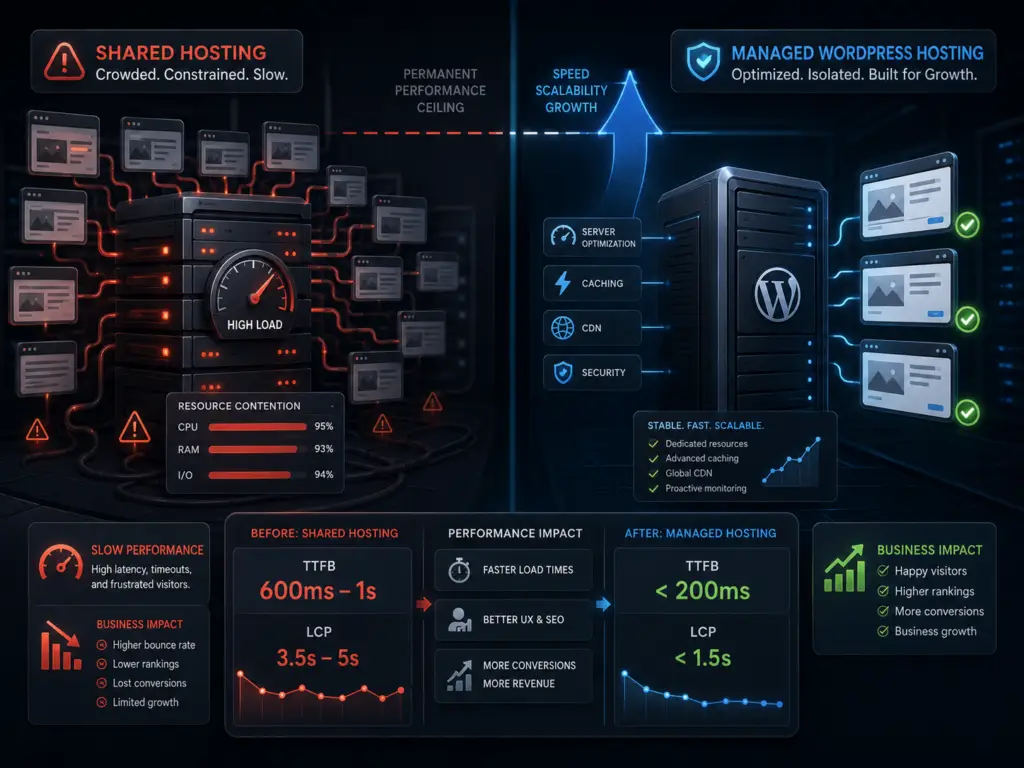
Choosing web hosting is a strategic decision, not just a recurring expense. Cheap shared hosting can permanently limit your site’s speed and growth, no matter how much you tweak your theme or plugins. Understanding what you get—and what you give up—with bargain hosting helps you avoid performance ceilings that cost you visitors and revenue.
01Why Shared Hosting Is Slow by Design
Shared hosting plans put your site on a server with hundreds, sometimes thousands, of other websites. Every site competes for the same limited resources: CPU, memory, disk access, and network bandwidth. If just one neighbor gets busy or misbehaves, everyone else feels the slowdown. Hosting companies oversell these servers to keep prices low, banking on most sites staying small and quiet.
This setup creates a permanent performance ceiling. No matter how much you optimize your WordPress install, you can’t outpace the limits of the physical server or the unpredictable traffic spikes from other tenants. The result is sluggish load times, especially at peak hours or during traffic surges.
For small brochure sites, this might seem tolerable at first. But as soon as you add more plugins, enable e-commerce, or start getting real traffic, the cracks show. Slow sites frustrate users and hurt your search rankings.
02The Numbers That Matter: TTFB and Beyond
One of the most telling metrics for hosting quality is Time To First Byte (TTFB). TTFB measures how long it takes for your server to start responding to a browser’s request. On shared hosting, TTFB often ranges from 600ms to over 1 second, even for simple pages. On well-managed WordPress hosting, TTFB can drop below 200ms.
- TTFB under 200ms: Excellent. Typical for premium managed hosts.
- 200–400ms: Good. Still fast for most uses.
- 400–600ms: Acceptable, but may indicate shared resources.
- 600ms and up: Slow. Common on bargain shared hosting.
Why does this matter? A slow TTFB means your site feels sluggish before any images or scripts even load. Google uses TTFB as a ranking factor, and users notice the lag. If your TTFB is consistently over 500ms, your host is holding you back.
Other metrics to watch include Largest Contentful Paint (LCP) and First Input Delay (FID). But TTFB is the canary in the coal mine. If it’s slow, no amount of frontend optimization can fully compensate.
03When Upgrading Hosting Pays for Itself
Managed WordPress hosting costs more—often $20 to $40 per month compared to $3 to $8 for bargain shared plans. But the benefits go beyond speed:
- Consistent performance: Resources are allocated for your site, not shared with random neighbors.
- Automatic updates: Core, plugin, and PHP updates are handled for you, reducing security risks.
- Daily backups: Easy restores if something breaks.
- Expert support: Staff trained specifically for WordPress issues.
For businesses relying on their website for leads or sales, the math is simple. Faster sites convert better and rank higher. Even a small bump in conversion rate or a few extra leads per month can offset the higher hosting cost.
We’ve seen clients move from $5 shared hosting to $30 managed plans and cut load times from 4–6 seconds to under 2 seconds. The improved experience led to longer visits and more inquiries—often within weeks of switching.
04How to Check If Your Hosting Is the Bottleneck
Before you blame your theme or plugins, test your site’s TTFB. Use tools like Pingdom, WebPageTest, or GTmetrix. Run tests at different times of day. If TTFB is consistently high, especially for simple pages, your host is likely the culprit.
Also, check your hosting plan’s resource limits. Many shared hosts restrict CPU seconds, simultaneous processes, or memory. If you see “Resource Limit Reached” errors in your cPanel or get warnings about high usage, it’s a sign you’ve outgrown your plan.
Don’t rely on promises of “unlimited” bandwidth or storage. These are marketing terms. The real limits are in CPU and memory allocation, which are rarely advertised up front.
05Common Pitfalls When Upgrading Hosting
Switching hosts is not always plug-and-play. Here are some common issues to watch for:
- Email hosting: Many managed WordPress hosts do not include email. Plan to move your email to a dedicated provider like Google Workspace or Zoho Mail.
- DNS changes: Updating your DNS records can take a few hours to propagate. Schedule your move during low-traffic periods.
- Plugin compatibility: Some managed hosts restrict certain plugins (like heavy caching or backup plugins) because they provide these features themselves. Review your plugin list before migrating.
06Making the Right Hosting Decision
Hosting is not just a bill to minimize. It’s a foundation for your site’s speed, reliability, and growth. Cheap shared hosting puts a hard cap on performance that no amount of optimization can break. If your TTFB is high and your site matters for business, upgrading to managed WordPress hosting is an investment that pays for itself through better rankings, happier users, and fewer headaches.
Review your current metrics, test alternatives, and weigh the real costs of staying slow. The right hosting can unlock your site’s full potential.
